
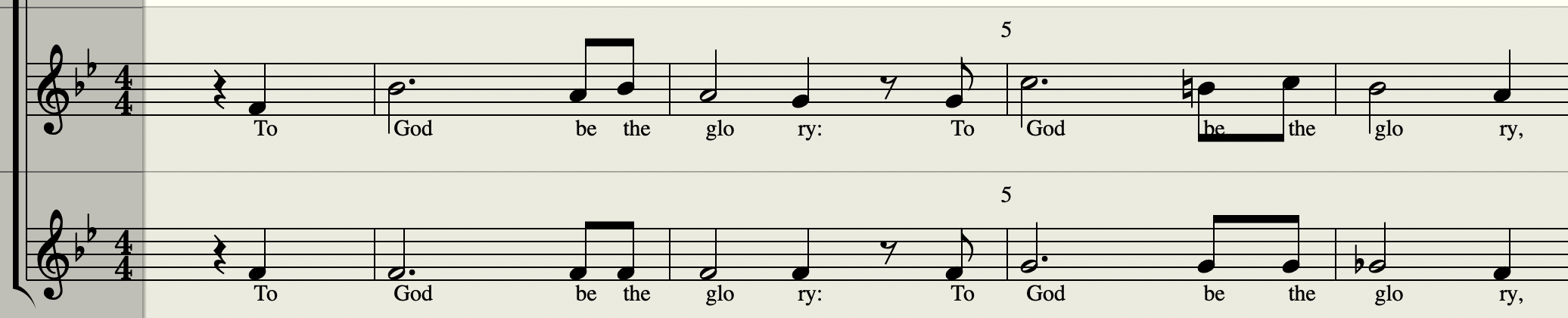
Soprano
Alto
SightSinger helps choir leaders, music teachers, singers, and songwriters turn MusicXML into singing audio with natural language workflow.
Turn your MusicXML sheet music into a singing audio demo using chat. No complicated setup or controls.
Use the score as the source of truth for notes, lyric syllables, and voice-part structure.
Generate section references and part-learning demos faster when rehearsal time is limited.
Ask for specific parts, verses, or singing directions without manual MIDI or phoneme editing.
Every vocal part you generate plays with the score's accompaniment.
Voice parts combined in one staff?
No worries, I'll split them.
SightSinger splits the requested voice line, fills lyric gaps, and checks the score structure before it sings.
Ask SightSinger to add solfege to the vocal parts you need, then sing those parts as a score-aligned practice reference.
Just need the solfege written into your score? Try the free MusicXML solfege tool →
Built for teams that already think in scores, parts, rehearsals, and vocal references.
“Parts in minutes”
Build SATB rehearsal references and communicate entrances, rhythm, and lyric pacing quickly.
“Practice examples from the score”
Create score-aligned vocal references for students without recording every line yourself.
“Instant vocal proof of concept”
Preview melodic ideas and harmonies before booking singers, studio time, or final production work.
“Learn the line faster”
Hear phrasing and note flow from sheet music instead of relying on piano-only references.
It is designed for fast score-led vocal demos and rehearsal tracks, not for replacing a full studio production workflow.
It gives you a clear musical reference for rehearsal and evaluation. It does not replace a live singer or finished vocal recording.
It does not write songs from text prompts. It sings the music you already wrote and follows the score closely.
It does not require recorded vocals or a base audio track. It starts from notation and sings directly from the score.
Speak music, not MIDI.
| Feature | SightSinger.app | Professional DAW (Digital Audio Workstation) |
|---|---|---|
| Interface | Natural Language (Chat) | Piano roll, parameters, phonemes |
| Learning Curve | Zero | Steep |
| Focus | Global style control, demo quality | Detailed note-level control, production quality |
| Time to result | Minutes | Hours |
Start with MusicXML from MuseScore, Finale, Sibelius, Dorico, Logic Pro, or an OMR-based workflow.
Choose the part, verse, or rehearsal outcome you need instead of rebuilding the whole arrangement in a DAW.
Turn the score into a vocal demo or rehearsal reference that communicates the musical idea quickly.
Iterate with natural language, export the new take, and send singers a reference they can actually use.
Generated audio with AI voices on SightSinger can be used commercially and royalty-free where permitted by the selected voice's terms.



Subject to each voicebank's credit notes and usage rules.
A plan for every singer, creator, and choir leader.
Try it out
For independent singers and creators
$69 billed yearly
For choirs and studios
$249$199 billed yearly
| What you generate | Credit usage | When it's charged |
|---|---|---|
| Vocal audio | 1 credit per 30 seconds | For each vocal part, every time you render it |
| Instrumental accompaniment (MIDI) | 1 credit per 2 minutes | Once per uploaded score, regardless of the number of instrument tracks |
Rounded up. Length follows your With repeats setting. The quote shows the exact credits before you confirm, and the final charge uses the actual audio length. Downloading the real-time mix is free.
I'm Alan, a software engineer and volunteer musician. I built SightSinger to solve a real score-to-singing problem I kept running into in choir and arrangement work.
Why a MusicXML score sometimes sings the wrong words, notes, or order, and how to fix lyrics, voices, verses, repeats, and instruments in your notation app before you generate.
A practical workflow for choir directors: one clear practice track per section, with their part loud, the accompaniment underneath, solfege first, and quick updates when the music changes.
A simple, practical workflow to turn PDF sheet music into a realistic singing demo using MusicXML and AI — no DAW, MIDI editing, or vocal synth setup required.
Upload a MusicXML score, choose a melody part, preview the added movable-do or fixed-do solfege lyric line, then print to PDF or download the derived score.
Check a MusicXML score before turning it into singing audio: lyrics, parts, voices, repeats, and instruments, with how to fix each in your notation app.
Answer six quick questions about your comfortable high and low notes, tessitura, and clef to get a suggested voice type, a range goal, and practice exercises.